
Collaboration
Collaboration is essential in a team of any size. Whether you are a sports section or an art school, you can count on Alora when it comes to attendance tracking. Here is an instruction on how to start collaborating with your team.
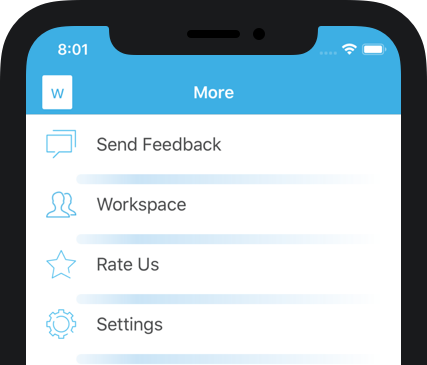
Step 1. Create a workspace
The first step is to create a workspace. You can do so in the “More” section of the app. Click on the Workspace and Create Workspace buttons. Here you need to provide a workspace name and your full name, so your team members can recognize who is inviting them.
Step 2. Invite team members
Congratulations, you’ve created a workspace! Now it’s time to invite first team member. Press the “Manage Members” button, then “Add Member.” Here you need to type-in team member’s email, choose permissions, and click “Send.” Great job! Your team member will receive an invitation email with a link to download the app and instructions on how to start collaborating.
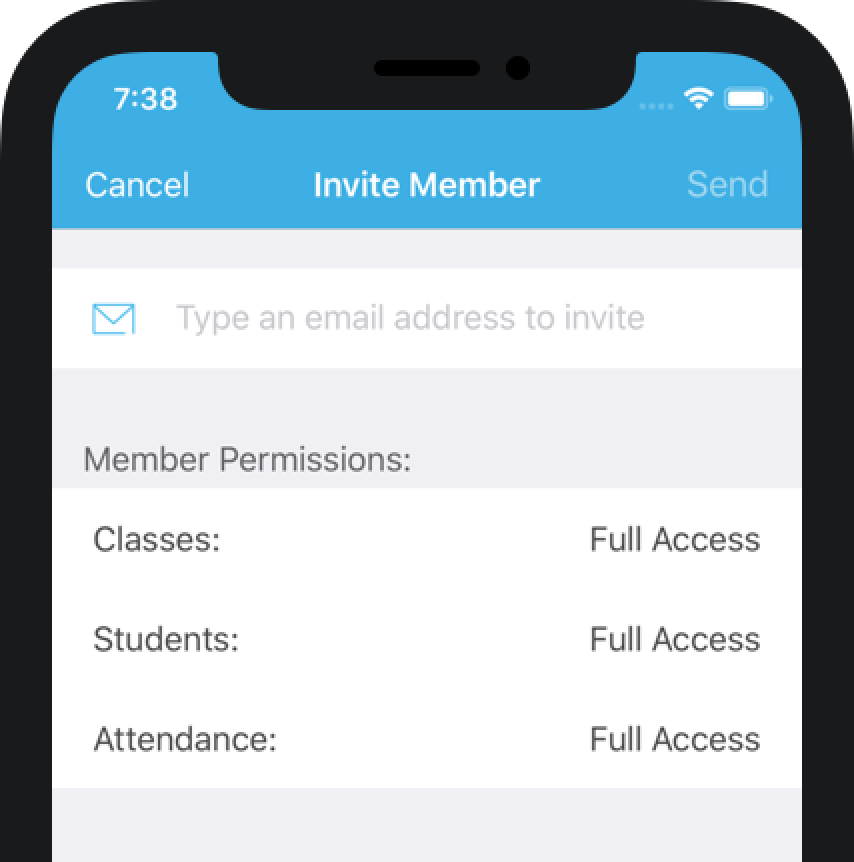
If you have any questions or suggestions, please contact us at support@aloraapp.com.
Dolor sit amet, consectetur adipiscing elit. Phasellus feugiat elit vitae enim lacinia semper. Cras nulla lectus, porttitor vitae urna iaculis, Melisandre tincidunt lectus. Brienne nec tellus sit amet massa auctor imperdiet imp vitae diam.
Elit vitae enim lacinia semper. Cras nulla lectus, porttitor vitae urna iaculis, Melisandre tincidunt lectus. Brienne nec tellus sit amet massa auctor imperdiet imp vitae diam.
Praesent urna velit, auctor nec turpis et, vehicula lobortis sem. Vivamus convallis mi sagittis eleifend laoreet. Praesent vitae venenatis enim. Nulla tincidunt Varys et lectus rhoncus laoreet.
Vivamus convallis mi sagittis eleifend laoreet. Praesent vitae venenatis enim. Nulla tincidunt Varys et lectus rhoncus laoreet. Aenean Gendry est nec diam suscipit iaculis.